


jBox.Corporate Features
Smart Ajax & Animation
JBC is totally Ajax based animated website template. But JBC's Ajax engine is very smart with a lot of great features, it is SEO Friendly, User Friendly and more. Learn more about JBC's Ajax features
jQuery Chop Slider
JBC comes with amazing jQuery Chop Slider, which is uses full power of CSS3 animation and provides compatibility for old browsers and for mobile devices. It also has a couple of great animation effects which are widely used in JBC.
Amazing Popups
JBC comes with really impressive popup engine, it allows you to call popup windows with HTML content (with Ajax) or with Image inside. There are two types of popups: "Rotate Popup" and "Magic Popup". Learn more about Amazing Popups
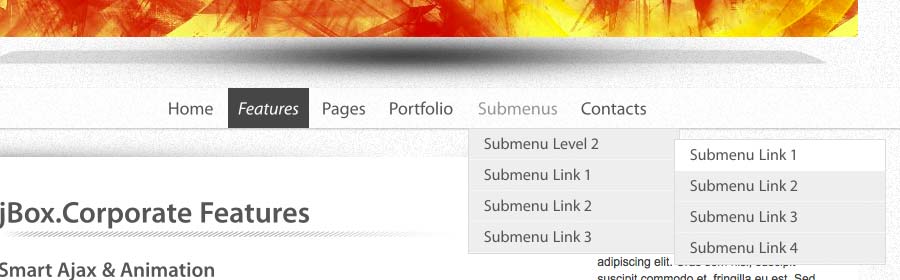
"Airy" Submenus
There are two types of avaliable submenus : "Airy" (which is enabled by default like the current ones) and simple "Slide Down". If your browser do not support CSS3 then the Airy submenu will be automatically switched to Slide Down submenu. But if you want you can force submenu to Slide Down in the template configuration file by changing only one variable, very simple. Besides, by default the submenu is on top of "parent link", and if you do not like it and want to use ordinary submenu on the bottom of "parent link", there is an option in configuration file, that you will need to change from "subMenuOnTop : true" to "subMenuOnTop : false". In this case it will look like this one:
Contact Form
JBC has ready to use page with Ajax based Contact form with validation and easy to configure Google Maps. Contact information is formatted with hCard microformat which is so loved by search engines!
Different Pages Transitions
JBC comes with four different transitions (animations) between pages - "Collapse-Slide-Expand", "Black Disk", "Broken Screen" and "Zoom Frame". Learn more about JBC transitions
Hover Effects
JBC powered with awesome wrapper for your links with images. This wrapper do everyhting for you, it will automatically add all neccessary code inside of the link depending on kind of this link. Learn more about JBC Image-Links
Google Web Fonts
JBC is ready to use with Google Web Fonts. If you want to use Google Web Fonts you will need to change two variables in the template configuration file. All you will need is to enable (enabled by default!) "use Google Fonts" option and enter the font name you want to use! That is done, and JBC will automatically insert all neccessary scripts for the Google font you've choose (due to the usage of Web Fonts API)!
Browser Compatibility
jBox.Corporate has great browser compatibility and compatible with all Major browsers, even with Internet Explorer 6. Because JBC is a very smart template, it uses automatically degradation for animation and effects based on browser (and its features) detection! Learn more how it works
Common features:
- Powered with jQuery
- 100% unique solution
- Smart, SEO Friendly, User Friendly Ajax engine
- Comes with amazing jQuery Chop Slider and its new animation methods
- Has three different page transitions (animation)
- Ajax Contact Form with validation and Google Maps, contact information is formatted with hCard microformat
- Google Web Fonts (with Web Fonts API)
- Flexible content layout
- Two types of Submenus: "Airy" or ordinary "Slide Down"
- Ready to use Typography
- Easy to configure Twitter Feed
- Flexible template configuration
- Amazing animation without Flash
- Easy to use Popup Engine. It allows you to call popup windows (with a required size) with any HTML content inside or with images
- Great browser compatibility (works in IE6 and higher)
- Comes with ready to use pages: Blog page, Blog post, Full width article, Article with sidebar, Contacts with Google Maps, Testimonials, 6 Portfolio layouts
- Validates with HTML 5
- 100% tableless CSS
- Easy to redesign, has very simple, smart and clear API
JBC Transitions


